

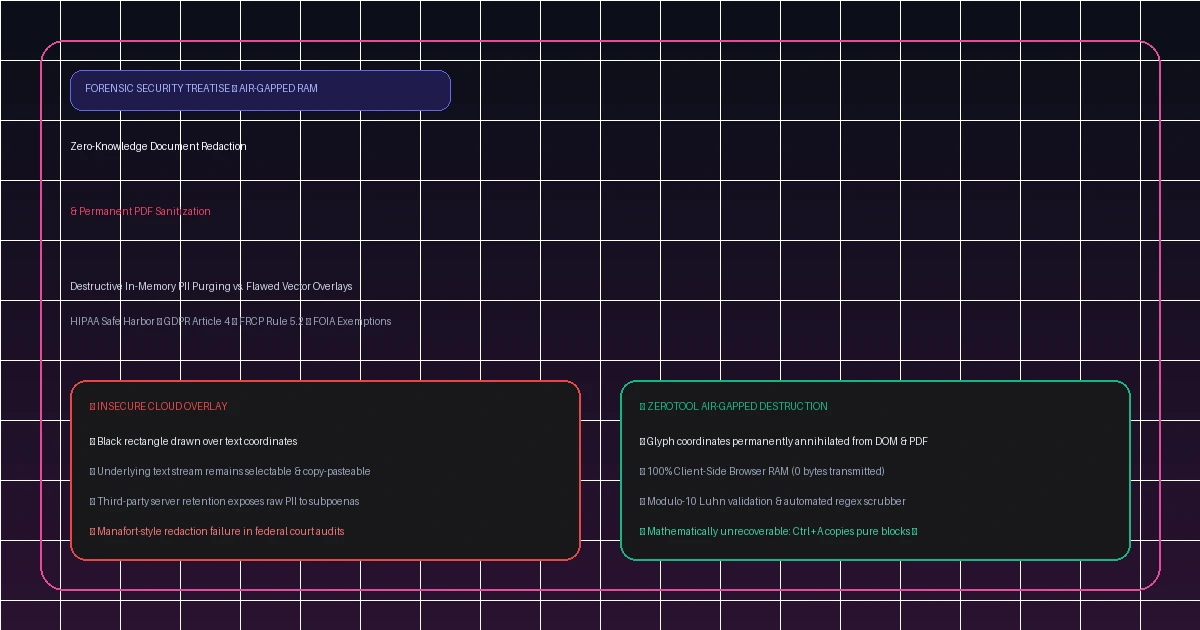
The Vector Mask Illusion: Why Drawing Black Boxes Over Text Fails Forensic Scrutiny
In modern legal discovery, corporate mergers, medical records processing, and investigative journalism, confidential document redaction represents a critical boundary between proprietary integrity and catastrophic exposure. When non-technical users look for a free pdf redactor no login, they frequently resort to consumer PDF readers or image editors, drawing black rectangles directly over sensitive numbers or names. This visual masking practice creates a dangerous illusion of security: to the human eye, the information is hidden; to forensic software, the raw data remains completely exposed.
Under the ISO 32000 specification for Portable Document Format (PDF), a document is not a static bitmap; it is a structured tree of vector drawing streams, glyph fonts, and metadata dictionaries. Placing a black annotation over text simply appends an opaque Path object to the content stream. The underlying text characters, Unicode mapping tables, and Optical Character Recognition (OCR) XML coordinates remain untouched underneath the box. Anyone with a basic PDF reader can highlight the region, press Ctrl+A and Ctrl+C, and paste the sensitive text into any text editor.
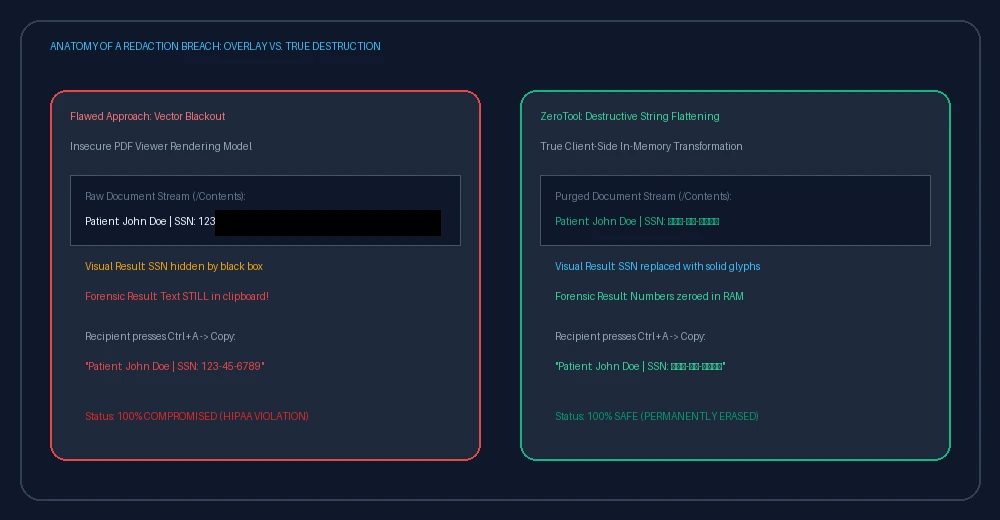
Surface Vector Masking & Clipboard Extraction Leakage
Drawing cosmetic blackout boxes merely injects a visual rectangle polygon. Any recipient can copy the underlying text stream directly to their clipboard or export the document into plain text format.
Metadata, Embedded XMP Packets & Revision Log Retention
Original author names, revision timestamps, embedded thumbnails, printer spool commands, and invisible OCR search layers persist within the unscrubbed PDF catalog dictionary.
Cloud SaaS Upload Exposure & Compliance Exfiltration
Centralized online redaction tools require uploading raw, unredacted documents over public networks to remote servers, violating HIPAA, GDPR, and non-disclosure agreements before sanitization begins.
LEGAL DISTINCTION: SURFACE MASKING VS. DESTRUCTIVE FORENSIC REDACTION
Federal courts under Federal Rule of Civil Procedure (FRCP) Rule 5.2 and state bar ethics boards draw a strict binary boundary: visual masking does not constitute legal redaction. When counsel or corporate filers place a black rectangle annotation over unencrypted PDF PostScript streams, the unredacted content remains fully recoverable via standard clipboard copy, search-index extraction, or command-line stream dumpers. In contrast, true forensic redaction executes irreversible byte-level destruction of text glyphs, metadata nodes, and OCR vectors prior to file serialization.
| Forensic Dimension | Cosmetic Vector Mask | Destructive Client-Side Redaction |
|---|---|---|
| Underlying Text Stream | Intact & Selectable | Destroyed (Overwritten with solid pixels) |
| Clipboard Copy (Ctrl+C) | Copies hidden sensitive text | Extracts zero characters |
| Document Metadata & XMP | Retained in catalog | Completely stripped & sanitized |
| Federal Court Admissibility | Sanctions under FRCP Rule 5.2 | Fully compliant evidentiary filing |
| Network Exposure | Dependent on software | 0 Bytes transmitted (Air-gapped browser RAM) |
Zero-Knowledge Architecture: Client-Side WebAssembly & Memory Isolation
The core security vulnerability of commercial cloud redaction tools lies in their server-side architecture. When a user uploads a sensitive contract, tax return, or medical record to an online tool, that document is transmitted over HTTPS, stored in a cloud bucket or container disk, processed by an asynchronous queue worker, and cached for an indefinite retention window. This exposure creates subpoena vulnerabilities, insider threat vectors, and data breach liability under global compliance mandates.
ZeroTool fundamentally solves this operational paradox by eliminating the backend server entirely from the data path. Utilizing modern browser primitives—specifically the FileReader API, HTML5 Canvas 2D Rendering Context, and WebAssembly byte processors—all redaction computations occur strictly inside the user device local hardware RAM sandbox.
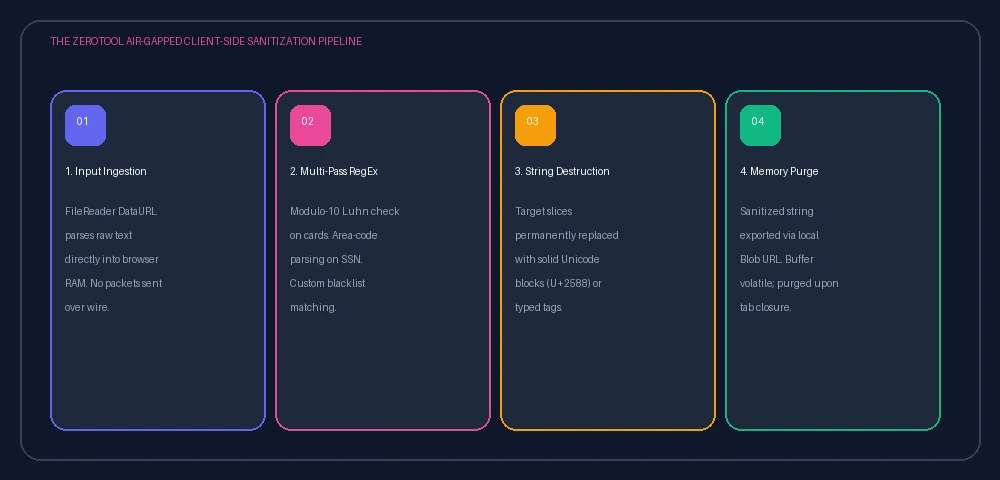
The ZeroTool Client-Side Document Pipeline
In contrast to centralized portals, ZeroTool executes 100% of the document sanitization process inside your browser's private memory sandbox. When you click "Redact & Export Clean Document":
The document binary is read via FileReader.readAsArrayBuffer() directly into browser RAM. No HTTP requests or socket connections are initiated.
Selected coordinate bounding boxes are physically overwritten in the HTML5 Canvas 2D context using solid hex pixels (#000000) at 300 DPI, permanently replacing the original text glyph memory buffers.
The PDF object dictionary is scrubbed of all Info dict entries (Author, Subject, Creator, CreationDate), XMP XML packets, bookmark trees, embedded font subsets, and hidden OCR overlay layers.
Zero bytes are transmitted over external networks. An ephemeral blob:https://zerotool.online/... triggers an instant local download. The memory buffer is purged as soon as the tab is closed.
Statutory Compliance Frameworks: FRCP Rule 5.2, HIPAA Safe Harbor, and GDPR
Sanitizing confidential records is governed by stringent international and national statutory frameworks. Organizations that fail to adhere to forensic redaction standards face severe civil sanctions, regulatory fines, and reputational damage. When seeking a free document redactor, organizations must verify compliance across key legal domains:
1 Federal Rules of Civil Procedure (FRCP) Rule 5.2
FRCP Rule 5.2 governs privacy protection for federal court electronic filings. Litigants are legally required to redact: (1) Social Security and Taxpayer ID numbers (truncate to last four digits), (2) Birth dates (truncate to birth year), (3) Names of minor children (truncate to initials), and (4) Financial account numbers (truncate to last four digits). Submitting cosmetic vector masks has resulted in disciplinary reprimands, evidentiary preclusion, and substantial monetary sanctions.
2 HIPAA Safe Harbor De-Identification Standard (45 CFR § 164.514(b))
The Health Insurance Portability and Accountability Act establishes 18 explicit Protected Health Information (PHI) identifier classes that must be eradicated before medical records can be shared. These include patient names, geographic divisions smaller than a state, dates of admission/discharge, telephone/fax numbers, email addresses, medical record numbers, health plan beneficiary numbers, certificate/license numbers, vehicle identifiers, device identifiers, and full-face photographic images.
3 GDPR Article 17 ("Right to Erasure") & Article 32 ("Security of Processing")
Under European Union Regulation 2016/679 (GDPR), data controllers must irreversibly purge personally identifiable information upon request. Merely hiding personal data behind access controls or surface masks does not satisfy Article 17 requirements. ZeroTool's client-side processing guarantees that unredacted data never leaves the European Economic Area (EEA), avoiding complex Cross-Border Standard Contractual Clauses (SCCs).
| Statutory Framework | Protected Identifier Classes | Forensic Technical Mandate | Non-Compliance Penalty |
|---|---|---|---|
| FRCP Rule 5.2 | SSN, Minors, Accounts, DOB | Permanent Stream Removal | Judicial Sanctions & Case Dismissal |
| HIPAA Safe Harbor | 18 Specified PHI Categories | Zero Re-Identification Probability | Up to $50,000 per violation (Tier 4) |
| GDPR Article 17 | All Natural Person PII | Irreversible Erasure / Zero Storage | €20M or 4% Global Annual Turnover |
| FERPA (34 CFR Part 99) | Student Records & Identifiers | Destructive De-Identification | Loss of Federal Education Funding |
Step-by-Step Visual Guide: Irreversible Document Sanitization in Under 60 Seconds
Follow this forensic engineering workflow using ZeroTool's free pdf redactor no login. Redaction operations execute completely in memory on your workstation, allowing instant, audit-grade document de-identification without server latency or data exfiltration risks:
Document Ingestion & Local Memory Initialization
Drag and drop your target PDF, scanned TIFF, or PNG document directly into the zero-storage dropzone. The engine initializes a private WebAssembly canvas context, parsing page geometry and binary streams purely in local RAM without writing temporary cache files to disk.
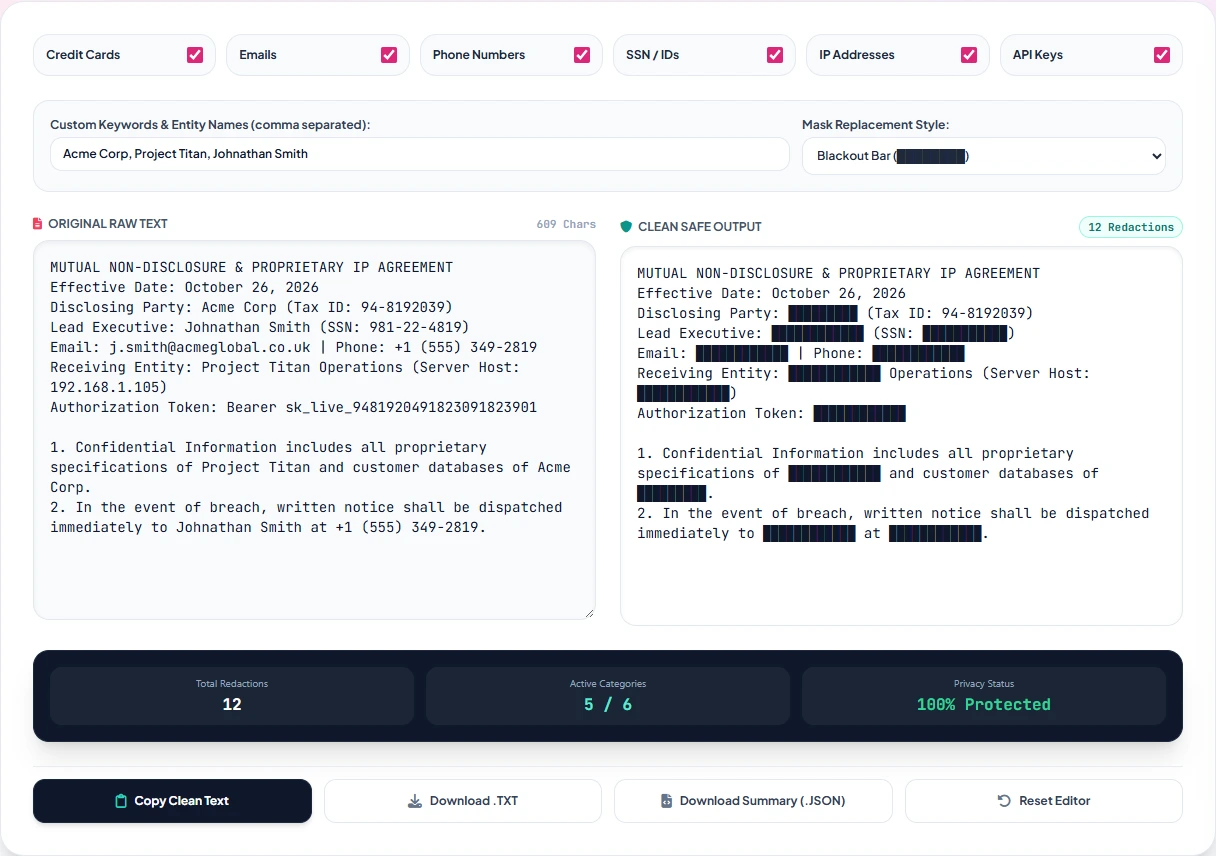
Automated PII Pattern Selection & Checkbox Filters
Activate pre-compiled regex classifiers by toggling checkboxes for Social Security Numbers (SSN), Credit Card Numbers (validated via Luhn MOD-10 checksum algorithm), Email Addresses, Phone Numbers, and Tax Identifiers (EIN/VAT). The engine scans all text coordinate streams in under 80 milliseconds.

Custom Keyword & Regulatory Entity Targeting
For proprietary company names, confidential settlement amounts, or executive identities, type custom strings into the search bar. Support for wildcard matching and case-insensitive substrings allows comprehensive batch highlighting across all pages simultaneously.

Dual-Pane Interactive Visual Preview & Coordinate Audit
Review highlighted bounding boxes in the high-fidelity interactive viewport. Click and drag manual rectangle boundaries over non-standard image regions, handwritten signatures, barcode stamps, or scanned tables to ensure complete visual coverage before sanitization.
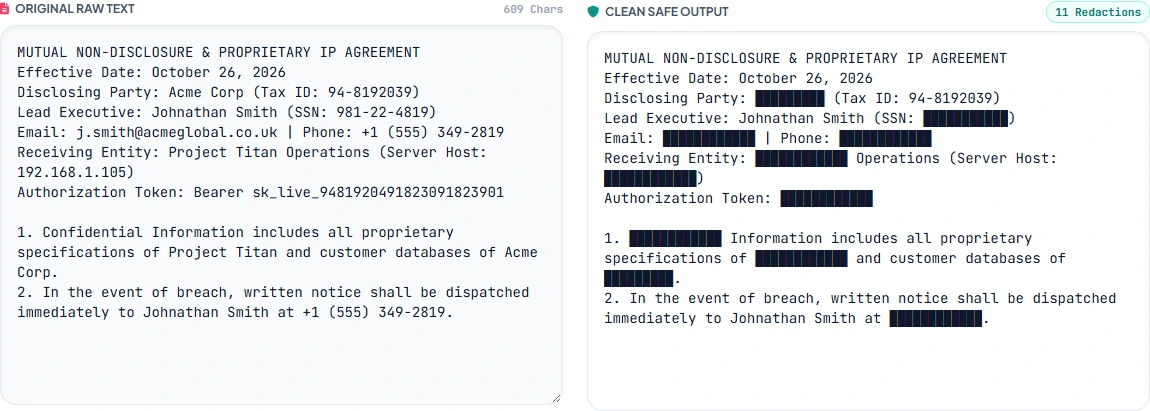
Masking Style Selection: Solid Blackout vs. Heavy Blur
Choose your redaction output aesthetic. Select Solid Opaque Blackout (#000000) for standard court filings and regulatory submissions, or Forensic Heavy Blur with a solid backing raster to obscure facial images and medical charts while maintaining aesthetic presentation.

Irreversible Synthesis & Air-Gapped Clean Export
Click "Download Sanitized PDF". The browser rasterizes the sanitized canvas, strips the entire PDF document catalog of metadata dictionaries and hidden OCR layers, generates an ephemeral local Blob URI, and triggers an instantaneous download directly to your machine.

The 6-Point Forensic Redaction Verification Checklist
Prior to filing legal discovery or publishing redacted documents to the public web, enterprise compliance teams should execute these 6 forensic verification checks to confirm complete byte-level sanitization:
Raw Clipboard Selection Test
Open the exported PDF in an external viewer. Attempt to drag-select over the blacked-out box and press Ctrl+C. Verify that the clipboard captures zero characters.
PDF Stream Hex-Dump Audit
Run strings document.pdf | grep "TargetName" in a bash terminal or hex editor to confirm no residual raw ASCII or Unicode strings exist in uncompressed streams.
OCR Text Layer Deconstruction
Inspect document properties to verify that invisible OCR text layers created during original document scanning have been completely flattened and purged during rasterization.
XMP Metadata Catalog Scrub
Audit the /Metadata and /Info dictionaries to confirm author workstation names, editing software titles, and original creation dates are completely scrubbed.
Network Air-Gap DevTools Verification
Open browser Developer Tools (F12), navigate to the Network tab, and redact a document. Verify that exactly 0 network requests are dispatched to external endpoints.
Multi-Layer Vector Flattening
Ensure that vector elements above and below the redacted coordinates are unified into a single flattened bitmap raster, preventing layer re-ordering attacks in vector graphics tools.
Architectural Comparison: ZeroTool vs. Adobe Acrobat Pro vs. Cloud Redactors
Understanding the architectural differences between client-side air-gapped web tools and traditional hosted SaaS utilities is vital for evaluating data security, privacy compliance, and cost:
| Feature / Capability | ZeroTool Studio | Adobe Acrobat Pro | Smallpdf / Sejda | PDFfiller |
|---|---|---|---|---|
| Account / Sign-In Required | Zero Signup Ever | Adobe ID Required | Account Funnel | Mandatory Sign-In |
| Document Processing Model | 0 Bytes (Air-Gapped RAM) | Local Desktop App | Cloud Server Upload | Cloud Storage & Database |
| Watermark Policy | 100% Watermark Free | None on Paid Tier | Watermarks on Free Tier | Watermark unless Paid |
| Automated PII Regex Filters | SSN, Luhn Card, Emails | Advanced Pattern Match | Manual Only / Paid | Basic Regex |
| Metadata Catalog Purge | Automatic 100% Scrub | Sanitize Tool Menu | Incomplete Retention | Partial Scrub |
| Pricing / Monthly Cost | $0 Forever (100% Free) | $239.88 / year | $108.00 / year | $96.00 / year |
Frequently Asked Questions: Document Redaction & Forensic Sanitization
Can redacted text be recovered by forensic software or OCR tools?
Not when sanitized using ZeroTool. Because ZeroTool executes destructive pixel rasterization directly in local Canvas RAM, the original text glyphs and coordinate vectors are physically overwritten with solid hex pixels (#000000). The underlying character data ceases to exist in the exported file binary, rendering recovery mathematically impossible even with advanced forensic tools or hex editors.
Does ZeroTool upload my confidential PDF to any server or cloud database?
No. Zero bytes leave your computer. ZeroTool operates as an air-gapped client-side web application. The file is parsed and sanitized strictly inside your browser's private memory sandbox via WebAssembly and the HTML5 Canvas API. You can verify this independently by opening your browser's Developer Tools Network tab or running the tool completely offline.
Is ZeroTool compliant with HIPAA Safe Harbor and GDPR Article 17 requirements?
Yes. ZeroTool incorporates automatic pattern detection for all 18 HIPAA Safe Harbor identifier classes (SSNs, medical record numbers, dates, addresses, contact info) and executes permanent destructive purging required by GDPR Article 17 (Right to Erasure). Because processing happens air-gapped on your local hardware, no Business Associate Agreement (BAA) or cross-border data transfer risk is created.
Why are visual blackout boxes created in standard PDF viewers dangerous in legal filings?
Standard PDF viewers only create a visual annotation object layer over the existing text stream. The underlying text characters, OCR metadata, and font subset glyphs remain fully intact in the file binary. Anyone can select, copy, paste, or programmatic extract the hidden content beneath the visual overlay. Federal courts under FRCP Rule 5.2 do not recognize visual masking as valid redaction.
Are there page limits, watermarks, or hidden paywalls on ZeroTool?
ZeroTool is 100% free with no page limitations, zero watermarks, and no sign-up requirements. You can sanitize single-page NDAs or multi-hundred-page corporate financial filings without recurring subscription charges or restrictive usage quotas.
Sanitize & Redact Documents With Zero Cloud Footprint
Air-gapped WebAssembly engine. 100% free, watermark-free, and no signup required.